Although fax machines are a dying transmitting medium (and we’ve been saying this for years!), we are still here to offer helpful tips for you and your fax. Out of the box, Sharp fax boards are paper conservative and have the fax confirmation page disabled. It only takes a few quick clicks or button presses to activate the fax confirmation page on your Sharp MFP.
- Type the IP address of your copier into a web browser and press Enter. If you do not have your IP address, click here for instructions on how to print it out.
- Click the System Settings tab.
- Click the Image Send Settings button.
- Click Fax Settings.
- Click Condition Settings on the left menu.
- Log in as admin (default password is admin).
-
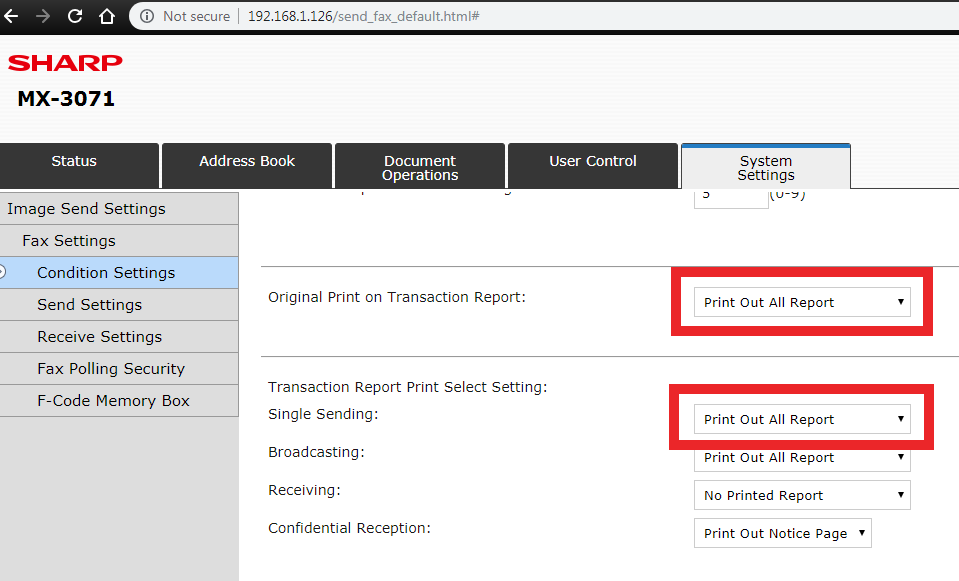
Scroll down to find Transaction Report Print Select Setting and change
Single Sending. - Just above that, change Original Print on Transaction Report to Print Out All Report if you would like a screenshot of the first page of your fax included on the confirmation page.
- Click Submit at the top or bottom of the page.
Sharp MFP Fax Confirmation Pages
Sharp multifunction printers (MFPs) offer a useful fax confirmation page feature that prints a report after each fax transmission. This report typically includes the recipient’s number, transmission time, and delivery status, helping users confirm successful delivery or troubleshoot errors.
By default, this feature is often disabled to conserve paper, but it can be easily enabled through the device’s web interface or control panel by adjusting the Transaction Report Print Select Setting. Users can choose to print confirmations for all faxes, only errors, or none at all based on their workflow needs.
Platinum Copier Solutions is the premier Sharp dealer in Texas. Contact us today for a free, no-hassle quote!


Kimberly Gonzalez founded Platinum Copier Solutions in 2007 after building her career in the copier and office equipment industry, which began at just 19 years old, selling Xerox copiers. Her early hands-on experience sparked a lifelong passion for document systems and office technology, ultimately inspiring her to launch her own company. As the 100 percent owner, Kimberly continues to lead Platinum Copier Solutions with a clear vision and commitment to quality.